 How an automatic trigger fires
For every automatic trigger the app stores a daily value, from your wearable, your phone, your food log or the weather for your city. Once an hour it checks each value against two lines: a fixed threshold, and two standard deviations from your own 14-day baseline. If either is crossed, a trigger is logged for that day, once, with the source marked as automatic. It is hourly polling of daily values, not real-time monitoring, so a trigger appears within the hour, not the second.
 The vestibular triggers are manual, on purpose
No wearable knows that you rolled over in bed or looked up at a shelf. VertigoMe ships a vestibular set that is manual by design: position change, looking up or neck extension, sudden head turn, rolling in bed, passive motion in a car or boat, visual motion from scrolling or crowds, loud noise, bright or flashing lights, strong smell, stress event, anxiety spike, letdown after stress, anger, high-sodium meal, MSG or processed food, tyramine-rich food, aged cheese, skipped meal, travel, jet lag and recent illness. Each is one tap in the quick log or a word in the story box, and each gets the same statistics as an automatic one.
 From your calendar and your phone
With calendar access, a workout in your events becomes an activity and a deadline or an interview becomes a stress trigger, pre-filled in your evening check-in with an Undo on each; the access is read-only and only what you keep is stored. On Android, screen time and late-night use come from usage access; on iPhone, late-night use is estimated from Apple Health. Ambient noise is sampled from the microphone while the app is open, or from an Apple Watch if connected.
Severity is yours to set
Each trigger carries a severity badge: High, Mild, Low or None. That badge is not learned from your data on its own. It comes from your setup answers, from edits you make in Manage Triggers, or from a recalibration proposal you accepted. Set a trigger to None and it stops counting towards your risk score. The statistics in Insights are separate and are computed from your data regardless of the badge.
Where it lives in the app
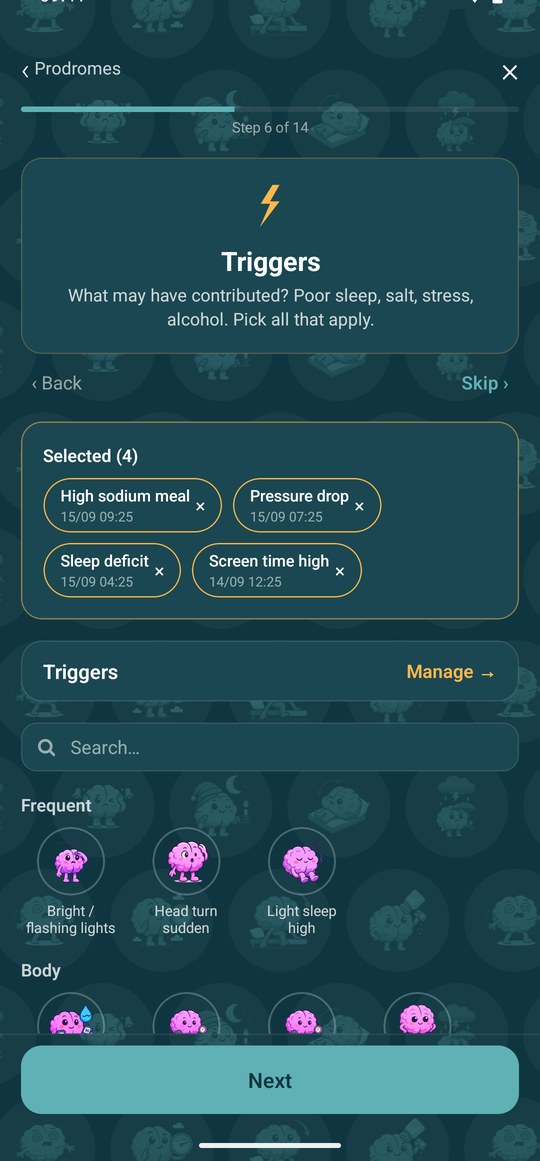
The trigger step of a spin log, where what has been recorded lately arrives already ticked, each with the time it happened, and you untick anything that does not belong. Manage Triggers holds the whole catalogue with the severity you set, and Monitor holds the graphs the automatic ones fire from.
What it needs from you
A few optional permissions, each earning its keep: location for weather and altitude, at city level only; usage access on Android for screen time and phone-read sleep; calendar access, read-only, for the events worth confirming. The vestibular triggers stay manual on purpose. Anything you skip simply leaves that trigger empty, and setting a trigger to None stops it counting.