
 Which ear, which exercise: your call
Every manoeuvre starts by asking which ear you are treating, with a note to use the ear your clinician identified and to ask first if you are not sure. The library is labelled as an educational guide, not medical advice or a diagnosis, and it says to do the exercises your clinician recommended. VertigoMe does not choose an exercise for you.
 How the coaching works
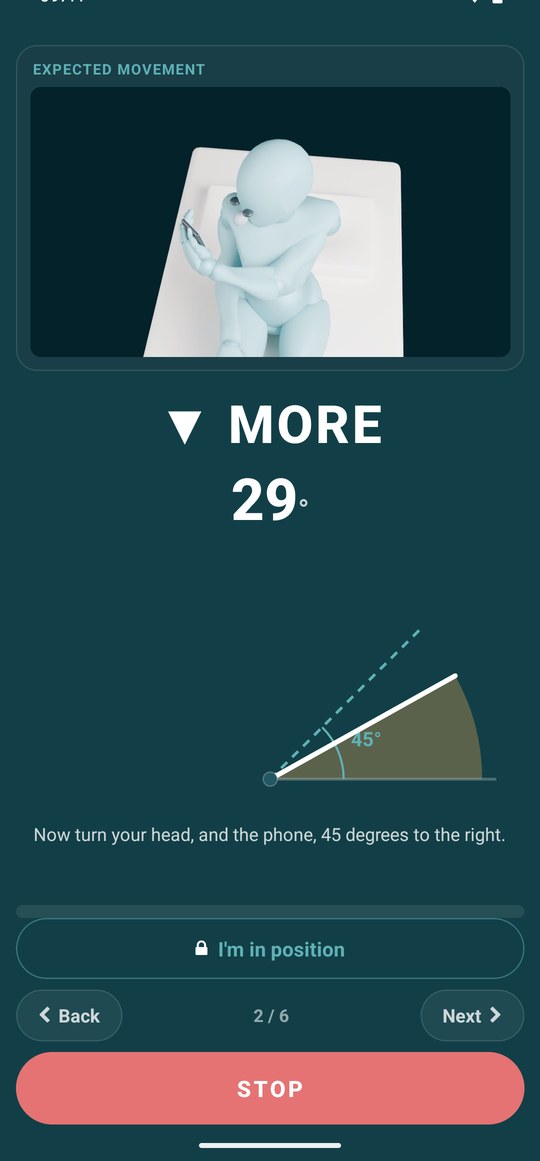
You hold the phone in front of your face like a mirror with the hand opposite the treated ear, and it stays with your face for the whole manoeuvre. The accelerometer gives the angle of your head; the app compares it with the target for each stage (for the Epley: lie back and hang, roll, sit up) and speaks the instruction, then MORE or BACK until you are within the band, then locks with a double buzz and counts the hold. Head turns that gravity cannot see are timed by voice. Balance retraining is the exception: the phone lies flat against your chest and measures sway.
Each session is capped at three rounds. If you are still spinning after a manoeuvre, the done screen offers to go again and shows which round you are on.
 Logged, so you can see if it helps
Finishing a manoeuvre logs it as a relief on the spin it belongs to, and the done screen asks one question, how helpful was this, so the What Worked page can score it like any other treatment. Gaze sessions are logged on their own and feed the programme level.
The gaze trainer and the camera
Gaze stabilisation is the VOR exercise: keep your eyes on a letter while turning your head side to side, then faster, then up and down, then against a moving target. With camera coaching on, the front camera tracks your head turns and tells you when swings are too shallow or behind the pace. The camera is analysis only, with no preview and nothing recorded, and the exercise works without it.
Where it lives in the app
The Exercises tab. Each manoeuvre opens on its own page: which ear you are treating, what to set up before you start, a pillow where your shoulders land, someone nearby the first time, and then Start guided run with voice on or off. The guided run shows one word at a time with a countdown, and a full-width STOP is on screen throughout.
What it needs from you
The phone, and a clinician's steer on which ear and which exercise: the app asks and does not diagnose. Motion sensors do the angle coaching; the camera is optional and used only by the gaze trainer, with nothing recorded. Voice can be switched off. The guidance is educational, not treatment, and it tells you to skip an exercise and speak to a clinician first if you have neck or back problems.